About
About
 Términos
 Privacidad
 Advertisment
 DMCA
DMCA
 Gmaps
Gmaps
 Rewards
 Refunds
 Desarrolladores
How to use Google SMTP service
Using App password for Google SMTP authentication. Google’s App Password is a 16-character passcode that gives a third-party app or device permission to access your Google Account. App Passwords can only be used with accounts that have 2-Step Verification turned on. 1: Create an App password. Go to your Google Account. On the left navigation panel, click Security. Under the “Signing in to Google” section, if 2-Step Verification is Off in your account, you need to select 2-Step Verification and follow the on-screen steps to enable it. Select App passwords in the “Signing in to Google” section. You may need to sign in again to confirm. In the App passwords page, click Select app and choose “Mail”, then click Select device and choose the device you’re using. Finally, click GENERATE. Follow the instructions to enter the App Password. The App Password is the 16-character code in the yellow bar on your device. 1: Create an App password. Go to your Google Account. On the left navigation panel, click Security. Under the “Signing in to Google” section, if 2-Step Verification is Off in your account, you need to select 2-Step Verification and follow the on-screen steps to enable it. Select App passwords in the “Signing in to Google” section. You may need to sign in again to confirm. In the App passwords page, click Select app and choose “Mail”, then click Select device and choose the device you’re using. Finally, click GENERATE. Follow the instructions to enter the App Password. The App Password is the 16-character code in the yellow bar on your device. 2: Set up Google SMTP in your mail client or your application with the following settings: SMTP server: smtp.gmail.com SMTP port: 587 SMTP TLS/SSL required: yes Authentication username: Your Gmail or Google Workspace account (e.g., someone@gmail.com or someone@company-domain.com) Authentication password: The App password generated in step 1 (e.g., vrdpivabcdexzwsj ) Method 2: Using the traditional Google SMTP service with “Less secure app access” enabled. Note: 1. This method only works for Google Workspace or Google Cloud Identity customers. For security reasons, Google does not allow third-party apps to sign in using only your Google Account username and password. This method no longer works for free Gmail accounts, but only for Google Workspace or Google Cloud Identity customers. 2. Enabling “Less secure app access” makes your account vulnerable. In most cases, we recommended “Method 1: using an app password for Google SMTP authentication” or “Method 3: using Google SMTP relay service”. 1: Turn on the “Less secure app access” option. Log in to your Google Account using a Google Workspace account, select Security on the left panel, then click the “Less secure app access” section. On the next page, switch on “Allow less secure apps”. 2: Set up Google SMTP in your mail client or your application using the following settings: SMTP server: smtp.gmail.com SMTP port: 587 SMTP TLS/SSL required: yes Authentication username: Your Google Workspace or Cloud Identity account (e.g., someone@company-domain.com) Authentication password: The password of your account.

Patrocinados
Patrocinados

Patrocinados
Patrocinados
Patrocinados
Patrocinados
Virtuala FansOnly
CDN FREE
Cloud Convert
Categorías
Read More
南山人壽未上市股票即時報價查詢!最新行情更新、安全交割保障、完整公司資料與投資討論區。專業平台嚴格把關,降低未上市股票交易風險,點擊查看詳情! 洞察台灣潛力股:南山人壽股價與新竹物流股價的發展新趨勢 台灣未上市股票市場近年來備受關注,許多潛力企業如「南山人壽股價」與「新竹物流股價」成為投資人研究的重點標的。這兩家企業在其所屬產業中佔有舉足輕重的地位,也吸引了投資者尋求長期穩健的成長機會。想深入了解這些公司,可參考南山人壽股價與新竹物流股價的詳細資料頁面。 南山人壽股價:壽險產業的隱藏巨人 南山人壽作為台灣壽險業的重要角色,其穩定的經營模式和廣泛的市場布局讓它在未上市市場中備受青睞。「南山人壽股價」常被視為長期投資的保守選擇,尤其是在金融市場波動時,壽險業的穩定現金流更突顯其抗壓性。近年來,南山人壽也積極數位轉型,推動線上投保與人工智慧風控機制,使其企業價值有望持續提升。...

Introduction As cyber threats continue to grow in complexity, organizations require highly skilled professionals who can defend digital infrastructures using advanced technologies. Traditional penetration testing methods are no longer sufficient in today’s AI-driven threat landscape. CPENT AI-Powered Penetration Testing Professional Training offered by WebAsha Technologies is designed to...
Overwatch, game updates, new hero, Master Chief, Halo, Emre, gameplay mechanics, Blizzard Entertainment, gaming community, video game crossover ## Introduction In a thrilling twist to the already expansive universe of Overwatch, Blizzard Entertainment has introduced a new hero that has fans buzzing with excitement. Dubbed Emre, this character draws striking parallels to the iconic Master...

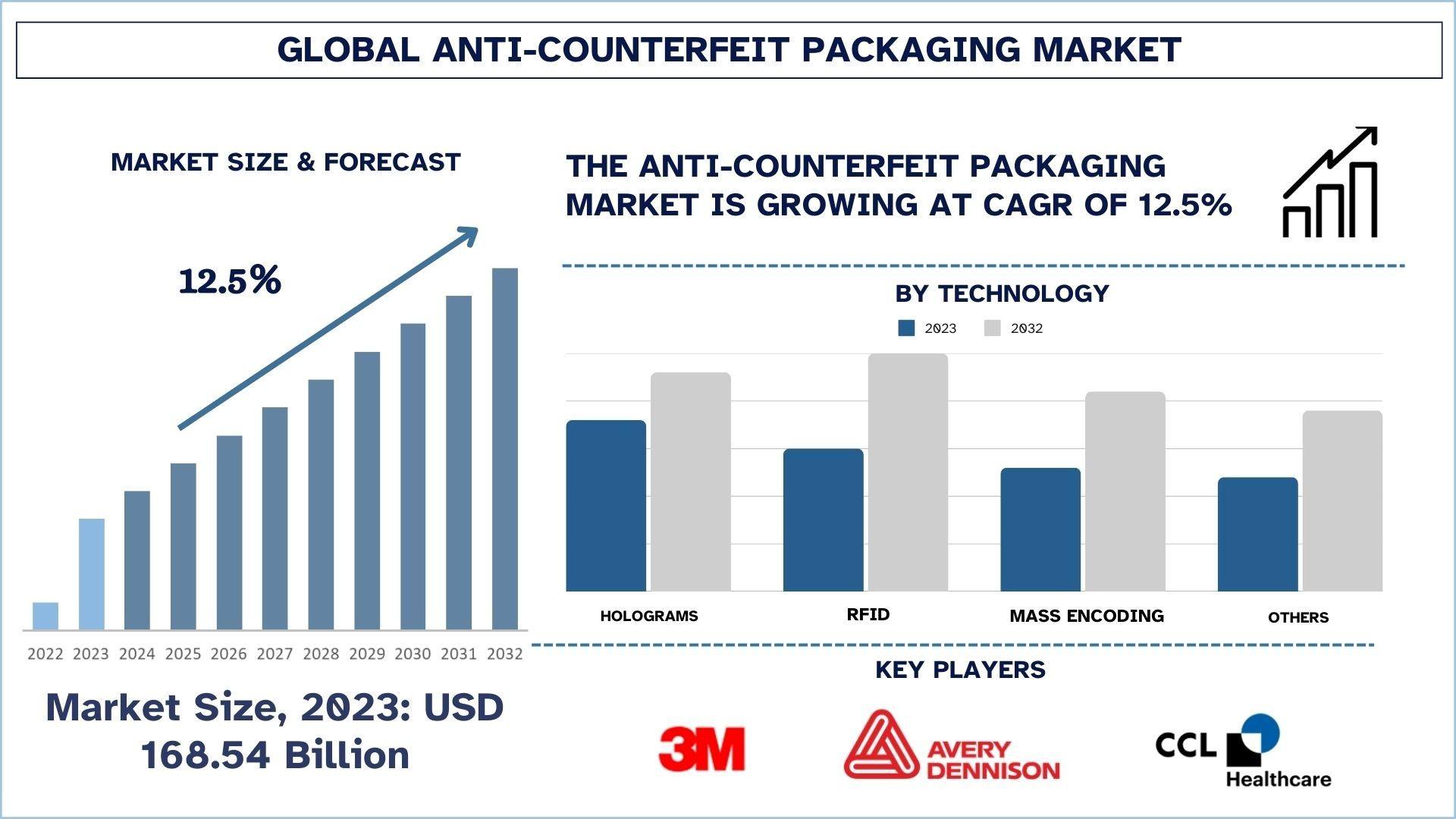
According to the UnivDatos, the growing prevalence of counterfeit products across industries like pharmaceuticals, food and beverages, and luxury goods drives the anti-counterfeit packaging market. As per their “Anti-counterfeit packaging Market” report, the global Market was valued at USD 168.54 billion in 2023, growing at a CAGR of about 12.5% during the forecast period from 2024...
Kreativität, Wertschätzung, Preisgestaltung, Selbstbewusstsein, Künstler, Tipps, Erfolg, Selbstwertgefühl Im heutigen kreativen Umfeld ist es von entscheidender Bedeutung, dass Künstler und Kreative ihren wahren Wert erkennen und sich nicht unter Wert verkaufen. Oft neigen wir dazu, unsere Talente und Fähigkeiten zu unterschätzen, was zu einem Gefühl der Entmutigung und Frustration führen...