Über
Über
 Bedingungen
 Datenschutz
 Advertisment
 DMCA
DMCA
 Gmaps
Gmaps
 Rewards
 Refunds
 Entwickler
How to use Google SMTP service
Using App password for Google SMTP authentication. Google’s App Password is a 16-character passcode that gives a third-party app or device permission to access your Google Account. App Passwords can only be used with accounts that have 2-Step Verification turned on. 1: Create an App password. Go to your Google Account. On the left navigation panel, click Security. Under the “Signing in to Google” section, if 2-Step Verification is Off in your account, you need to select 2-Step Verification and follow the on-screen steps to enable it. Select App passwords in the “Signing in to Google” section. You may need to sign in again to confirm. In the App passwords page, click Select app and choose “Mail”, then click Select device and choose the device you’re using. Finally, click GENERATE. Follow the instructions to enter the App Password. The App Password is the 16-character code in the yellow bar on your device. 1: Create an App password. Go to your Google Account. On the left navigation panel, click Security. Under the “Signing in to Google” section, if 2-Step Verification is Off in your account, you need to select 2-Step Verification and follow the on-screen steps to enable it. Select App passwords in the “Signing in to Google” section. You may need to sign in again to confirm. In the App passwords page, click Select app and choose “Mail”, then click Select device and choose the device you’re using. Finally, click GENERATE. Follow the instructions to enter the App Password. The App Password is the 16-character code in the yellow bar on your device. 2: Set up Google SMTP in your mail client or your application with the following settings: SMTP server: smtp.gmail.com SMTP port: 587 SMTP TLS/SSL required: yes Authentication username: Your Gmail or Google Workspace account (e.g., someone@gmail.com or someone@company-domain.com) Authentication password: The App password generated in step 1 (e.g., vrdpivabcdexzwsj ) Method 2: Using the traditional Google SMTP service with “Less secure app access” enabled. Note: 1. This method only works for Google Workspace or Google Cloud Identity customers. For security reasons, Google does not allow third-party apps to sign in using only your Google Account username and password. This method no longer works for free Gmail accounts, but only for Google Workspace or Google Cloud Identity customers. 2. Enabling “Less secure app access” makes your account vulnerable. In most cases, we recommended “Method 1: using an app password for Google SMTP authentication” or “Method 3: using Google SMTP relay service”. 1: Turn on the “Less secure app access” option. Log in to your Google Account using a Google Workspace account, select Security on the left panel, then click the “Less secure app access” section. On the next page, switch on “Allow less secure apps”. 2: Set up Google SMTP in your mail client or your application using the following settings: SMTP server: smtp.gmail.com SMTP port: 587 SMTP TLS/SSL required: yes Authentication username: Your Google Workspace or Cloud Identity account (e.g., someone@company-domain.com) Authentication password: The password of your account.

Gesponsert
Gesponsert

Gesponsert
Gesponsert
Gesponsert
Gesponsert
Virtuala FansOnly
CDN FREE
Cloud Convert
Kategorien
Mehr lesen
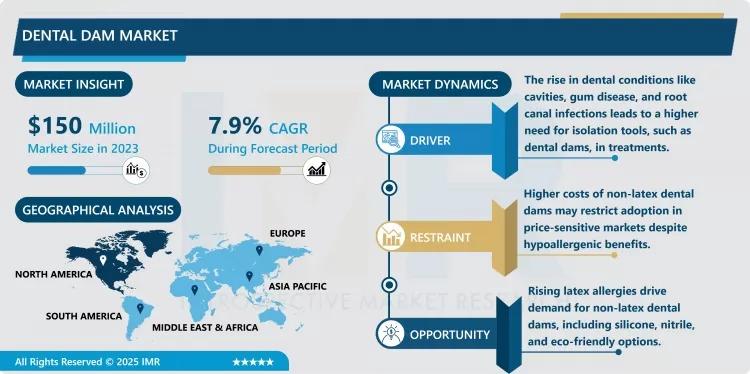
According to a new report published by Introspective Market Research, Dental Dam Market by Material, Product Type, and Application, The Global Dental Dam Market Size Was Valued at USD 415.22 Million in 2024 and is Projected to Reach USD 577.62 Million by 2032, Growing at a CAGR of 4.2%. A dental dam is a thin, flexible sheet...
स्टारबक्स, कॉफी की दुनिया का बादशाह, अब अपने कैफे में प्रिंटर लगाने पर रोक लगा रहा है। यह सुनकर आपको शायद हंसी आ रही होगी, लेकिन यह गंभीरता से सोचने का समय है। क्या दूरस्थ कार्य ने हमें इस हद तक पहुंचा दिया है कि हम कैफे में डेस्कटॉप पीसी की जरूरत महसूस करने लगे हैं? आइए इस नासमझी के काम को समझते हैं। ## दूरस्थ कार्य का असली चेहरा ### कॉफी और कंप्यूटर का अनोखा मेल जब हम दूरस्थ कार्य के बारे...

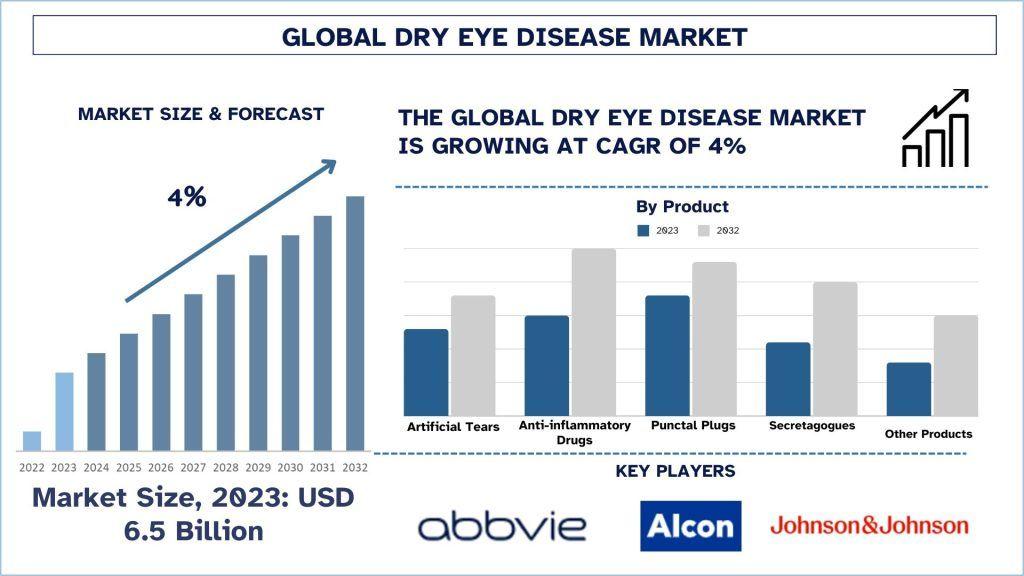
According to the UnivDatos, the surge in the incidence of dry eye disease cases and the rise in demand for personalized medicine will drive the global scenario of Dry Eye Disease. As per their “Dry Eye Disease” report, the global Market was valued at USD 6.5 billion in 2023, growing at a CAGR of about 4% during the forecast period from 2024 - 2032 to reach USD billion by...
## Introduction In the ever-evolving world of 3D modeling and rendering, accessibility and innovation are key to unlocking creative potential. A recent release from the developer of Kiri Engine introduces a remarkable free tool, **3DGS Render**, which allows users to seamlessly manipulate and render **3D Gaussian splats** directly within **Blender**. This exciting add-on is not only a...

Endesa, data breach, cybersecurity, personal data protection, customer data security, unauthorized access, data privacy, identity theft --- ## Introduction In an alarming turn of events, Endesa, one of Spain's leading energy companies, has reported a serious data breach that has raised significant concerns regarding the security of customer information. This incident not only highlights the...