


How to Choose Cloud Solutions for Your Business Needs

Choosing the right technology can make a significant difference to how efficiently a business operates, manages information, and serves its customers. As organizations grow, they often need more storage, better collaboration tools, stronger security, and flexible computing resources. Cloud Solutions can help meet these requirements, but selecting the right services requires careful consideration. The best option for one company may not suit another because businesses differ in size, budget, industry, technical capabilities, and long-term goals.
Rather than choosing a cloud service based only on price or popularity, businesses should evaluate their actual needs and compare available options. A thoughtful decision can improve productivity, control technology costs, and create a reliable foundation for future growth.
1. Identify Your Business Requirements
The first step is understanding what your business expects from cloud technology. Some organizations need secure file storage, while others require business applications, database hosting, remote collaboration, or infrastructure for demanding workloads.
Start by identifying the problems you want to solve. For example, your team may struggle with sharing documents, maintaining local servers, backing up important records, or supporting employees who work remotely. Listing these challenges helps narrow the available Cloud Solutions and prevents spending money on features that do not support your objectives.
2. Understand the Main Types of Cloud Solutions
Cloud services generally fall into three main categories, each serving different business requirements.
-
Software as a Service (SaaS): Provides ready-to-use applications through the internet, such as email, accounting, customer relationship management, and collaboration software.
-
Platform as a Service (PaaS): Offers an environment for developing, testing, and deploying applications without managing every underlying infrastructure component.
-
Infrastructure as a Service (IaaS): Provides computing resources, networking, and storage that businesses can configure according to their technical needs.
Understanding these categories makes it easier to choose a service that matches your team's capabilities. A small business looking for online accounting software may need SaaS, while a development company building custom applications may benefit from PaaS or IaaS.
3. Set a Realistic Cloud Budget
Cost is an important factor when evaluating cloud services. Traditional infrastructure may require substantial upfront spending on hardware, software, maintenance, and technical support. Cloud services can reduce some initial investment by offering subscription-based or usage-based pricing.
However, cloud expenses can increase when businesses use more resources than expected, maintain unnecessary subscriptions, or overlook data transfer and support fees. Before choosing Cloud Solutions, compare monthly and annual costs, implementation expenses, migration requirements, licensing, and potential future growth. A clear budget should include both expected savings and the ongoing cost of managing the service.
4. Evaluate Security Features
Businesses may store customer records, financial information, employee details, and confidential documents in the cloud. Protecting this information should therefore be a priority when comparing providers.
Look for features such as encryption, multi-factor authentication, access controls, activity logging, and security monitoring. Consider whether the provider supports your data protection obligations and offers clear guidance for managing security risks. Remember that using a reputable provider does not remove every responsibility. Your business must configure services correctly, manage user permissions, protect devices, and train employees to recognize cyber threats.
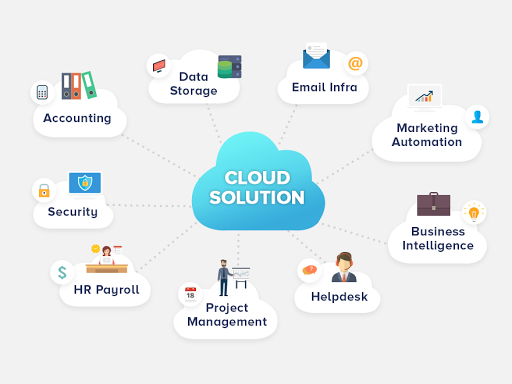
5. Check Data Storage and Backup Options
Different businesses have different storage requirements. A professional services company may mainly store documents and email, while a media business may need substantial capacity for large images, videos, and project files.
Estimate how much data you currently manage and how quickly it is likely to grow. Then compare storage limits, performance, file recovery features, backup options, and retention policies. Suitable Cloud Solutions should provide enough capacity for current operations while allowing you to expand when necessary. Confirm whether backups are included or require a separate service, and test recovery procedures before relying on them for critical information.
6. Consider Scalability and Future Growth
Your technology requirements may change as your business attracts more customers, hires employees, or expands into new markets. A service that works today may become restrictive if it cannot accommodate additional users, applications, or workloads.
Choose cloud services that allow you to adjust resources without unnecessary disruption. Flexible capacity can help businesses respond to seasonal demand, new projects, or changing operational requirements. At the same time, avoid paying for excessive capacity before it is needed. Review growth plans and select an option that provides practical flexibility rather than complexity your business cannot manage.
7. Assess Performance and Reliability
Cloud applications need to perform consistently to support daily business activities. Slow systems, service interruptions, or unreliable connections can affect employee productivity and customer satisfaction.
When comparing providers, review their published availability commitments, support arrangements, infrastructure locations, and performance options. Consider how far your employees and customers are from the relevant service infrastructure, especially if applications require fast responses. Your business should also evaluate its internet connectivity and establish contingency procedures for critical operations.
8. Review Compatibility With Existing Systems
Many businesses already use accounting software, customer management tools, inventory platforms, or custom applications. A new cloud service should work effectively with these systems rather than creating additional data silos.
Check whether the service supports integrations, data exports, standard file formats, and application programming interfaces. Consider how information will move between systems and whether employees will need to enter the same data repeatedly. Before adopting Cloud Solutions, test important integrations to identify compatibility issues early and reduce the risk of operational disruption.
9. Compare Provider Support and Expertise
Even well-designed cloud services can require assistance during setup, migration, troubleshooting, or routine management. Reliable support can be particularly important for small businesses without a dedicated IT department.
Review the provider's available support channels, service hours, response commitments, documentation, and additional support costs. You should also consider how easily employees can learn the system and whether training resources are available. A provider that offers appropriate assistance can make adoption smoother and help your team resolve technical issues more confidently.
10. Understand Compliance and Data Control
Some businesses operate under rules that govern how personal, financial, or industry-specific information must be stored and processed. These requirements may influence which cloud services are appropriate.
Before making a decision, identify the regulations and contractual obligations that apply to your organization. Ask where data will be stored, how it can be accessed, what records are available for auditing, and how information can be retrieved or deleted when necessary. Verify compliance claims carefully and ensure that the selected service supports your actual obligations.
11. Test Before Making a Final Decision
Choosing a cloud provider based only on product descriptions can lead to unexpected difficulties. A trial or limited pilot allows your team to evaluate the service in a real working environment before making a larger commitment.
Test essential features, performance, security settings, integrations, and ease of use. Ask employees for feedback and compare the results against the goals established at the beginning. If possible, start with a non-critical workload so that problems can be addressed without affecting essential business operations.
12. Plan for Migration and Long-Term Management
Selecting a provider is only one part of adopting cloud technology. Moving data, configuring applications, training staff, and maintaining security all require time and planning.
Create a migration plan that includes responsibilities, timelines, data backups, testing, and recovery procedures. After implementation, review costs, performance, access permissions, and employee feedback regularly. A clear exit strategy is also useful because it helps your business understand how to retrieve data and transition to another service if requirements change.
Final Thoughts
Choosing the right Cloud Solutions requires more than comparing prices or selecting a well-known provider. Businesses should assess their operational needs, budget, security requirements, storage capacity, scalability, performance, compatibility, and support options before making a commitment.
By testing suitable services, planning migration carefully, and reviewing performance over time, organizations can select cloud technology that supports their current operations and future ambitions. A well-matched cloud strategy can improve efficiency, simplify technology management, and give your business the flexibility needed to grow with confidence.

 English
 Arabic
 French
 Spanish
 Portuguese
 Deutsch
 Turkish
 Dutch
Dutch
 Russian
 Romaian
 Portuguese (Brazil)
 Greek
Greek
 Hrvatski
 Cehoslowakia
