


When Should a Business Upgrade Its Barcode Printing Equipment?
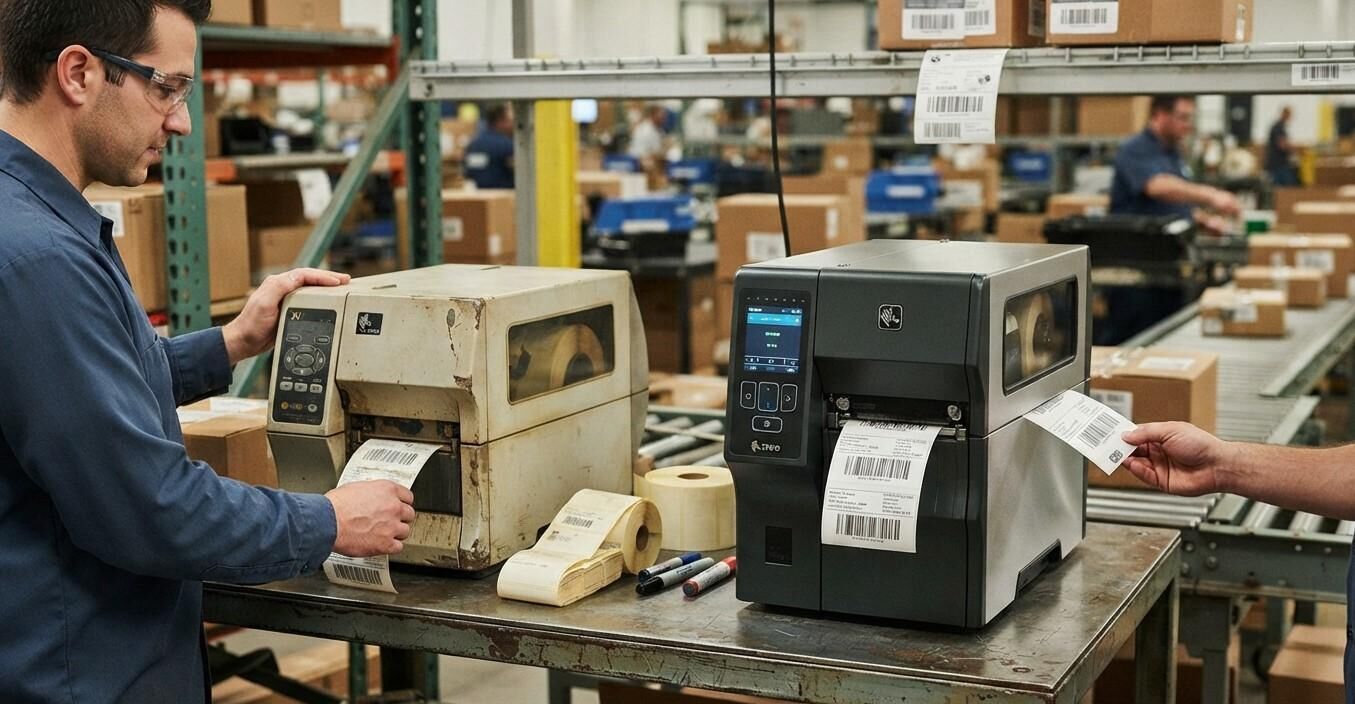
Barcode printing equipment plays an essential role in inventory management, product labeling, warehouse operations, retail, manufacturing, and shipping. Businesses rely on accurate, readable barcode labels to track products, manage stock, process orders, and maintain efficient workflows. However, as operations grow and technology changes, existing barcode printing equipment may no longer meet a company's needs.
Knowing when to upgrade barcode printing equipment can help businesses reduce downtime, improve printing quality, and support long-term operational growth. While replacing equipment too early can create unnecessary expenses, delaying an upgrade may lead to higher maintenance costs, slower workflows, and recurring barcode scanning problems.
In this guide, we explain the key signs that indicate it may be time for an upgrade, the benefits of modern barcode printing equipment, and the factors businesses should consider before investing in new technology. Pointus Solutions can help businesses explore barcode equipment and supplies, while Shop Barcode offers access to relevant Printing Products for different operational requirements.
Table of Contents
- Why Barcode Printing Equipment Matters
- 8 Signs Your Business Needs an Upgrade
- Benefits of Upgrading Barcode Printing Equipment
- Factors to Consider Before Buying New Equipment
- How to Plan a Barcode Printing Equipment Upgrade
- Common Mistakes to Avoid
- Frequently Asked Questions
- Conclusion and Call to Action
1. Why Barcode Printing Equipment Matters
Barcode printing equipment helps businesses create labels that support product identification, inventory tracking, asset management, and shipping processes. Depending on the application, businesses may use desktop, industrial, mobile, direct thermal, or thermal-transfer printers.
When the equipment matches the workload, employees can print labels efficiently and maintain consistent barcode quality. However, a printer that is outdated, underpowered, or incompatible with current systems can slow down operations.
For example, a small retail store may begin with a desktop printer but eventually need an industrial model as its order volume increases. Similarly, a manufacturer may require more durable labels or faster printing capabilities as production demands become more complex.
Reviewing equipment performance regularly helps businesses determine whether repairs, process improvements, or a complete upgrade will provide the best value.
2. 8 Signs Your Business Needs an Upgrade
1. Frequent Printer Breakdowns
Occasional maintenance is normal, but recurring breakdowns may indicate that a printer is reaching the end of its useful service life or is unsuitable for its workload.
Repeated mechanical failures, persistent media-feeding issues, and frequent component replacements can interrupt daily operations. If employees regularly stop work to troubleshoot printing problems, it may be time to compare repair costs with the benefits of newer equipment.
Before replacing a printer, confirm that the problem is not caused by incorrect settings, incompatible supplies, or insufficient maintenance.
2. Declining Barcode Print Quality
Clear barcode printing is essential for reliable scanning. Faded bars, inconsistent darkness, missing lines, and poorly aligned labels can cause scanning errors and disrupt workflows.
Some print-quality problems can be resolved by cleaning the printhead, adjusting settings, or replacing worn components. However, if defects continue despite appropriate maintenance, the equipment may need repair or replacement.
Businesses handling high volumes of products should pay particular attention to recurring quality issues because even small printing defects can create substantial rework over time.
3. Your Business Has Outgrown Its Current Printer
A printer that worked well when a business was small may struggle as printing demand increases.
Signs of insufficient capacity include:
- Long queues of labels waiting to be printed.
- Delays during busy production or shipping periods.
- Frequent pauses between print jobs.
- Excessive wear from continuous operation.
- Difficulty meeting daily labeling targets.
An industrial barcode printer may be more appropriate for demanding, high-volume environments, while a desktop model may remain suitable for lower-volume applications. The right choice depends on print volume, duty cycle, label dimensions, and workplace conditions.
4. Printing Costs Keep Increasing
Older equipment may become expensive to operate when it requires frequent repairs, replacement parts, or excessive maintenance. Poor print quality can also increase consumable waste when labels must be discarded and printed again.
Businesses should evaluate the total cost of ownership rather than comparing purchase prices alone. Include equipment costs, maintenance, consumables, employee time, downtime, and expected service life.
If an upgrade reduces recurring expenses and improves productivity, investing in new equipment may be more cost-effective than continuing to repair an aging printer.
5. The Printer Is Too Slow for Current Workflows
Printing speed matters when businesses produce large quantities of shipping labels, product tags, inventory labels, or manufacturing identification labels.
A slow printer can create bottlenecks when other operations depend on labels being available on time. Employees may need to wait for print jobs, and order processing may become less efficient during peak periods.
When evaluating an upgrade, consider not only the advertised print speed but also the actual workflow. Label size, print density, connection speed, software processing, and the time required to change supplies can all influence overall productivity.
6. Your Business Needs Different Label Types
As businesses expand, they may need to print different label sizes, materials, or formats.
For example, a company may move from printing basic indoor inventory labels to producing durable product labels, shipping labels, or labels for demanding industrial environments.
An existing printer may not support the required media width, printing method, resolution, or ribbon configuration. Upgrading to compatible equipment can help businesses accommodate new applications without relying on inefficient workarounds.
Before purchasing, confirm that the new printer supports the intended label materials and printing supplies.
7. Compatibility Issues Affect Your Operations
Business systems change over time. New inventory software, warehouse management systems, enterprise applications, or operating systems may introduce compatibility requirements that older printers cannot meet easily.
Common challenges include outdated drivers, limited connectivity, unsupported software, and difficulty integrating printers into existing workflows.
If these issues create repeated delays or require complicated workarounds, newer equipment with suitable interfaces and software support may simplify printing operations.
Check compatibility with your current applications, network environment, and operating systems before selecting a replacement.
8. Your Business Needs Better Mobility or Automation
Modern operations may require printing labels closer to products, workstations, or shipping areas. Businesses may also want to reduce manual steps by connecting printers with scanners, mobile computers, or inventory systems.
A fixed printer may not be ideal for every workflow. Mobile barcode printers can support on-the-go labeling, while network-connected equipment can make printing more accessible across departments.
An upgrade may be worthwhile when it supports a clearly defined operational improvement, such as reducing unnecessary movement, standardizing label formats, or streamlining repetitive print jobs.
3. Benefits of Upgrading Barcode Printing Equipment
Replacing outdated equipment can offer several practical advantages when the new printer is selected according to business needs.
Improved Printing Consistency
Suitable modern equipment can produce consistent, readable labels when paired with compatible media and correct settings. This helps reduce avoidable scanning errors and label reprints.
Higher Operational Efficiency
Printers designed for the required workload can help employees complete labeling tasks faster and reduce delays during busy periods.
Reduced Maintenance Disruptions
Replacing unreliable equipment may reduce unexpected downtime and repeated repair work, particularly when spare parts or technical support for an older model are difficult to obtain.
Greater Flexibility
The right printer may support a wider range of label formats, connectivity options, or printing environments, allowing the business to adapt as its needs change.
Better Support for Business Growth
A properly planned upgrade can help a business accommodate increasing order volumes, additional locations, new product lines, and changing labeling requirements.
These benefits are not automatic. The results depend on selecting suitable equipment, implementing it correctly, and maintaining it according to the manufacturer's recommendations.
4. Factors to Consider Before Buying New Equipment
Before upgrading, businesses should assess their current requirements and future plans.
Printing Volume
Estimate how many labels you print daily and during peak periods. Choose equipment designed to handle the expected workload without excessive wear.
Print Resolution and Quality
Consider the size and complexity of the barcodes, the information printed on each label, and the scanning requirements. Smaller barcodes or detailed graphics may require a higher resolution.
Printing Technology
Direct thermal printing can suit applications where labels have a limited required lifespan and do not need a ribbon. Thermal-transfer printing uses a ribbon and can be appropriate for applications requiring durable labels. The best method depends on the label material, environment, and expected service life.
Label and Ribbon Compatibility
Confirm that the printer supports the required media width, label type, ribbon configuration, and core dimensions. Selecting compatible supplies helps prevent avoidable printing and feeding problems.
Connectivity and Software
Check support for the connections, drivers, and applications used by your business. Consider whether USB, Ethernet, wireless connectivity, or integration with existing systems is required.
Total Cost of Ownership
Compare the initial purchase price with the expected costs of supplies, maintenance, repairs, training, and downtime. A higher-priced printer may provide better value if it is more suitable for your workload, but this should be assessed using actual business requirements.
Support and Availability of Supplies
Consider warranty terms, technical support, replacement parts, and the availability of compatible labels and ribbons. Reliable access to supplies helps maintain consistent operations after installation.
5. How to Plan a Barcode Printing Equipment Upgrade
A structured upgrade process can help businesses avoid unnecessary spending and minimize disruption.
- Review current performance: Document breakdowns, print-quality issues, printing delays, and maintenance costs.
- Identify operational requirements: Establish the required daily print volume, label types, print resolution, and environmental conditions.
- Check whether repair is sufficient: Determine whether cleaning, replacement parts, updated drivers, or better supplies could resolve existing problems.
- Compare suitable models: Evaluate printer capacity, compatibility, features, support, and total operating costs.
- Test before full deployment: Where possible, test sample labels and verify barcode readability using your actual scanners and workflow.
- Train employees: Explain new operating procedures, media loading, routine cleaning, and troubleshooting.
- Monitor results: Track print quality, downtime, label waste, and workflow performance after installation.
For businesses operating multiple locations, standardizing equipment and label settings may also simplify training, purchasing, and maintenance.
6. Common Mistakes to Avoid
Businesses can reduce upgrade risks by avoiding several common mistakes:
- Buying based on price alone: A low-cost printer may not handle the intended workload.
- Ignoring future requirements: Equipment should accommodate realistic business growth without unnecessary overcapacity.
- Overlooking supply compatibility: Labels and ribbons must match the printer and application.
- Failing to test barcode readability: A label that looks clear may still perform poorly with the actual scanning system.
- Ignoring software integration: Confirm that the printer works with the applications and operating systems your business uses.
- Replacing equipment without investigating the cause: Some problems can be resolved through maintenance, settings adjustments, or better consumables.
A careful assessment helps businesses choose an upgrade that addresses real operational challenges instead of simply replacing equipment because it is old.
7. Frequently Asked Questions
1. How often should a business replace its barcode printer?
There is no universal replacement schedule. The decision depends on print volume, maintenance history, equipment condition, parts availability, and changing business requirements. Upgrade when the printer can no longer meet operational needs reliably or cost-effectively.
2. Should I repair or replace an old barcode printer?
Repair may be appropriate when the problem is isolated and the equipment still meets your requirements. Replacement may be more practical when breakdowns are frequent, parts are difficult to obtain, or ongoing costs exceed the value of continued use.
3. What type of barcode printer is best for a growing business?
The best choice depends on label volume, print quality, media requirements, and the working environment. Desktop printers often suit lower-volume applications, while industrial printers are designed for more demanding workloads. Mobile printers can be useful when labels need to be printed away from a fixed workstation.
4. Will a new barcode printer improve scanning accuracy?
It can help if the existing printer produces inconsistent or defective labels. However, scanning accuracy also depends on barcode design, print settings, label quality, scanner configuration, and the condition of the printed label.
5. What should I check before purchasing a new barcode printer?
Review print volume, resolution, printing method, media compatibility, connectivity, software support, maintenance requirements, and total cost of ownership. Test sample labels whenever possible before making a final decision.
6. Can I use my existing labels and ribbons with a new printer?
Possibly, but compatibility should be confirmed. Check the printer's supported media dimensions, printing technology, ribbon requirements, and material specifications before reusing existing supplies.
7. Where can businesses find barcode printing equipment and supplies?
Businesses can explore Pointus Solutions and browse Shop Barcode for relevant Printing Products. Compare product specifications with your operational needs to identify suitable equipment and consumables.
8. Conclusion and Call to Action
Upgrading barcode printing equipment becomes important when frequent breakdowns, poor print quality, rising operating costs, limited capacity, or compatibility issues begin affecting daily operations. The right upgrade can improve printing consistency, reduce downtime, support business growth, and make labeling workflows more efficient.
Before investing, assess your current equipment, determine your printing requirements, and compare suitable models based on performance, compatibility, maintenance, and long-term value. A well-planned upgrade should solve existing problems while supporting your business's future needs.
Ready to improve your barcode printing operations? Explore Pointus Solutions to learn more about barcode printing options. Visit Shop Barcode to discover available Printing Products and find equipment and supplies suited to your business requirements.

 English
 Arabic
 French
 Spanish
 Portuguese
 Deutsch
 Dutch
Dutch
 Italiano
 Russian
 Romaian
 Portuguese (Brazil)
 Greek
Greek
 Hrvatski
 Cehoslowakia
