Custom Logo Digitizing for BAi Mirror Embroidery Machine
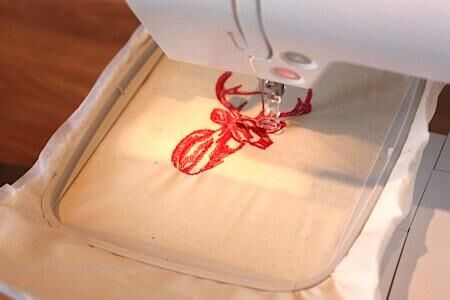
Introduction: Feeding Your BAi Mirror the Right Files
You just unboxed your BAi Mirror embroidery machine. The 15 needles gleam, the 10‑inch touchscreen glows, and you are ready to stitch your first logo. Then you plug in a USB with your JPG file, and nothing happens. The screen stares back blankly. I have seen this confusion more times than I can count. Your BAi Mirror does not speak picture language. It speaks stitch language. That means you must convert logo for BAi Mirror embroidery machine before you can sew a single thread.
Here is the good news. The conversion process is not magic, and you do not need a computer science degree. You just need to understand what your BAi Mirror actually wants, how to prepare your artwork, and whether to do the digitizing yourself or hire a pro. I walk you through all of it in plain English, with zero fluff and plenty of practical advice from someone who has learned these lessons the hard way.
What File Formats Your BAi Mirror Actually Needs
Let me save you hours of frustration right now. Your BAi Mirror embroidery machine reads exactly two file formats: DST and DSB .
That is it. Not JPG, not PNG, not PDF, not SVG. Just DST and DSB. If you load anything else, your machine either refuses to run or produces a chaotic mess of thread that looks nothing like your logo.
DST is the industry standard. It was originally created for Tajima machines, but now every commercial embroidery brand, including BAi, Brother, and Ricoma, accepts it . DST files contain all the stitch data your machine needs: needle movements, stitch directions, color change commands, and trim instructions. Think of DST as the universal language of embroidery. No matter which machine you upgrade to later, DST files will follow you.
DSB is the other option. It comes from Barudan machines and works similarly to DST . Some digitizers prefer DSB for certain projects, and your BAi Mirror reads it without complaint. But for simplicity and compatibility, stick with DST. It is what most professional digitizing services deliver, and it is what most online design marketplaces offer.
One more thing. Your BAi Mirror also has a photo embroidery feature that accepts JPG files, but those specialized JPGs are not regular photos. They must be converted through BAi's own software before the machine can interpret them . For logo work, ignore this feature. Stick with DST.
Why You Cannot Just Convert a JPG to DST
Here is where a lot of beginners get tripped up. You see an online file converter, upload your JPG, and click "convert to DST." The website gives you a file. You load it into your BAi Mirror. And the result looks terrible. What went wrong?
Real digitizing is not a simple format conversion. When you change a JPG to a PNG, you are just repackaging the same pixel information. But when you create a DST file, you are building stitch-by-stitch instructions from scratch . The software must decide where to put each needle puncture, what type of stitch to use, how dense the stitching should be, and in what order to sew everything.
Auto-digitizing tools try to guess all of this. Sometimes they guess right on very simple designs. Most of the time, they guess wrong. You end up with jump stitches everywhere, thread breaks, and a logo that looks like a kindergartner drew it .
Proper digitizing is a manual skill. A human digitizer looks at your logo, identifies which parts need satin stitches for smooth edges and which parts need fill stitches for large areas. They add underlay stitches that you never see but that prevent puckering. They apply pull compensation so circles stay round instead of turning into ovals .
What a Properly Digitized BAi File Includes
Whether you digitize it yourself or hire a professional, your finished BAi file must include several key elements to stitch cleanly.
Correct stitch types for each element. Letters and borders need satin stitches, which are dense zigzag stitches that create a smooth, raised edge. Large filled areas need tatami or fill stitches, which look like a brick pattern and cover space efficiently. Fine details need running stitches, which are simple straight lines .
Proper underlay. Think of this as the foundation of a house. Underlay stitches go down first, securing the fabric so the top stitches sit cleanly without shifting. Skipping underlay on stretchy fabrics like polo shirts or fleece guarantees puckering .
Pull compensation. Here is a weird fact about embroidery. Thread tension actually pulls fabric inward as the needle punches through. A perfectly circular logo in your software can come out looking like an oval on fabric because the thread literally pulled the fabric shape inward. Pull compensation means the digitizer overshoots the edges slightly so the finished design looks correct .
Appropriate density. Too many stitches per inch and your thread breaks constantly while the fabric stiffens like cardboard. Too few stitches and you see fabric peeking through gaps. Good digitizing balances density for your specific fabric type .
Step-by-Step: How Professionals Convert Your Logo
When you send a logo to a professional digitizing service like Absolute Digitizing or Digitizing Buddy, here is what they actually do.
First, they review your artwork. They check for tiny details that will not stitch cleanly, like extremely small text or very thin lines. If your logo has gradients or drop shadows, they simplify those because thread cannot reproduce those effects .
Second, they choose stitch types for each element. Outlines become satin stitches. Large shapes become fill stitches. They select stitch angles that follow the natural flow of your design .
Third, they add underlay. Depending on your fabric type, they choose the right underlay pattern. A stretchy performance polo gets different underlay than a structured jacket back .
Fourth, they set density and pull compensation. They adjust stitch count based on the final size of your logo. A small left chest logo needs different density than a large back design .
Fifth, they assign thread colors and sequence. They match your brand colors to the closest thread available and arrange the stitching order to minimize unnecessary color changes .
Sixth, they export as DST and test it. The best digitizers run a physical sew-out on fabric similar to yours before sending you the file .
DIY Digitizing vs Hiring a Professional
You can digitize your own logos if you want to learn the skill. The software options include Wilcom Hatch, which costs a few hundred dollars, and Ink/Stitch, which is completely free but has a steep learning curve .
Here is the reality check. Learning professional digitizing takes months of practice. Your first dozen designs will sew out poorly while you figure out density, underlay, and pull compensation. If you are running a business with paying customers, those mistakes waste fabric, thread, and time.
Professional digitizing services charge between ten and twenty dollars per logo. For that price, you get a file that works the first time, every time. They handle the technical details so you focus on production .
Common Mistakes When Converting Logos for BAi
I have seen these errors destroy good designs. Avoid them.
Sending a low-resolution image. If your logo is a pixelated mess from a website, the digitizer cannot guess what the details should look like. Always send the highest resolution version you have .
Forgetting to specify the final size. A design digitized for a four-inch chest logo will not stitch correctly at ten inches. The density changes. Tell your digitizer the exact dimensions you need.
Using the wrong format. I have watched people load PES or JEF files into BAi machines and then wonder why the machine throws errors. Double-check that you received DST or DSB.
Skipping the test sew-out. Even the best digitizer cannot perfectly predict how your specific fabric will behave. Always run a test on scrap material before stitching expensive garments.
Final Thoughts
Your BAi Mirror embroidery machine is a powerful tool capable of stunning results. But it depends entirely on the files you feed it. Convert your logo properly into DST or DSB format, and your machine produces clean, professional embroidery that makes your brand look amazing. Skip the digitizing step or do it poorly, and you waste time, thread, and customer goodwill.
Whether you learn to digitize yourself or hire a professional service, the key is understanding what your BAi Mirror actually needs. Now you know. Format first, quality digitizing second, and test always. Go stitch something great.

 English
 Arabic
 French
 Spanish
 Portuguese
 Deutsch
 Turkish
 Dutch
Dutch
 Italiano
 Russian
 Portuguese (Brazil)
 Greek
Greek
 Hrvatski
 Cehoslowakia