

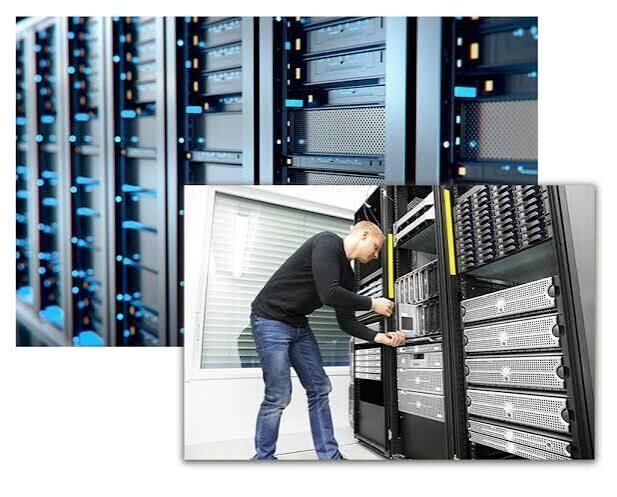
How Can Proper Server Installation and Configuration Improve Business IT Performance?

Behind almost every modern business operation is an IT infrastructure that keeps information organised and applications running. Employees access shared files, use business software, communicate with customers, and manage important records throughout the working day. When the systems supporting these activities become unreliable, productivity can suffer.
Servers play an important role in keeping these operations connected. They provide centralised resources for storing information, running applications, managing users, and supporting communication between devices. However, purchasing server hardware alone does not guarantee reliable performance. The equipment must be selected, installed, secured, and configured according to the organisation's requirements.
Professional Server Installation & Configuration helps businesses establish a stable technology environment that can support daily workloads and future expansion.
Why Do Businesses Need a Properly Configured Server?
As organisations grow, managing business information across individual computers becomes increasingly difficult. Employees may need access to the same documents, applications, databases, or internal resources. Without a centralised arrangement, maintaining consistent access and security can become challenging.
A properly configured server provides a structured way to manage these resources. It can support file sharing, user authentication, business applications, database operations, backups, and network services.
For example, a company with several departments can store shared documents on a central server and assign access permissions according to employee responsibilities. This reduces the need to maintain multiple disconnected copies of important files.
Servers can also support business continuity by providing controlled access to essential applications and information. The exact benefits depend on the server architecture, software, and infrastructure design.
What Should Businesses Consider Before Installing a Server?
Server planning should begin with an assessment of the organisation's operational requirements. Choosing hardware without understanding expected workloads can result in unnecessary expenses or insufficient performance.
The first consideration is the number of users and devices that will connect to the server. A small office supporting a limited number of employees will have different requirements from an organisation running resource-intensive applications across multiple departments.
Storage capacity is another important factor. Businesses should estimate how much information they currently store and how quickly that volume is expected to increase. They should also consider whether the workload requires traditional hard drives, solid-state drives, or a combination of storage technologies.
Processing power and memory matter as well. Applications involving databases, virtual machines, analytics, and multiple simultaneous users may require more powerful processors and additional RAM.
Organisations should also evaluate whether an on-premises server, cloud-based infrastructure, or hybrid environment is more suitable. Each option has different cost, management, performance, and security considerations.
How Does Professional Server Installation Work?
A reliable installation involves several stages rather than simply placing equipment in a rack and connecting cables.
Site preparation: The installation location should provide suitable ventilation, physical security, power availability, and protection from environmental risks. Businesses operating dedicated server rooms may also require cooling and access restrictions.
Hardware installation: The server is mounted or positioned according to the manufacturer's requirements. Storage devices, memory, network interfaces, and other components are checked before the equipment is connected.
Network connectivity: The server is connected to the appropriate switches, routers, and network infrastructure. Network settings are configured to support reliable communication with authorised devices.
Operating system installation: The selected server operating system is installed and updated. Required drivers, management tools, and essential software are configured according to the planned workload.
Testing and documentation: The installation team checks hardware health, network connectivity, storage availability, and application functionality. Configuration details should be documented for future maintenance and troubleshooting.
Following these steps helps create a more predictable environment and reduces the possibility of problems caused by incomplete setup.
Why Is Server Configuration So Important?
Installation establishes the physical equipment, while configuration determines how the server operates within the business environment.
A poorly configured server may have enough hardware capacity but still experience performance problems, security weaknesses, or access issues. Proper configuration ensures that resources are allocated appropriately and that employees can use the services they need.
User accounts and permissions should be established according to job responsibilities. Employees should receive access only to the information and applications required for their work. Administrative accounts should be restricted to authorised personnel.
Network settings, storage permissions, system updates, and security policies also need attention. Depending on the workload, configuration may include directory services, database platforms, virtualisation, remote access, and application hosting.
Monitoring tools can help administrators track resource usage, identify unusual activity, and detect performance issues before they become serious disruptions.
How Can Businesses Protect Their Servers and Important Data?
Servers often contain valuable business information, making security a critical part of infrastructure management. A security incident, hardware failure, or accidental deletion can interrupt operations and potentially cause significant data loss.
Businesses should begin with basic security controls, including strong authentication, restricted administrative access, firewall configuration, and regular software updates.
Data backups are equally important. A reliable backup strategy should define what information needs protection, how frequently backups are created, and where copies are stored. Keeping an additional backup separate from the main production environment can reduce the impact of certain incidents.
However, creating backups is not enough. Businesses should test their recovery procedures periodically to confirm that important information can actually be restored.
Physical protection also matters. Servers should be kept in controlled locations with suitable access restrictions. Power protection, environmental monitoring, and appropriate cooling can help reduce risks associated with equipment failure.
What Are the Benefits of Virtualisation and Scalable Infrastructure?
Many modern organisations use virtualisation to run multiple virtual machines on a single physical server. Each virtual machine can operate with its own allocated resources and software environment.
This approach can improve hardware utilisation and simplify the management of different applications. It may also make it easier to create test environments, deploy new services, and recover systems after certain failures.
Scalability should be considered during the initial design. A business may need additional storage, memory, processing capacity, or network resources as its workforce expands. Selecting suitable hardware and planning for future upgrades can help avoid expensive infrastructure changes later.
Cloud integration can provide additional flexibility for organisations that need remote access, off-site backups, or selected applications hosted outside their premises.
Why Should Businesses Choose Professional IT Infrastructure Support?
Server management requires technical knowledge and regular attention. Businesses without an experienced internal IT team may find it difficult to handle installation, configuration, security updates, troubleshooting, and infrastructure expansion independently.
A professional IT provider can assess existing requirements, recommend appropriate hardware, configure network connections, and establish maintenance procedures. Ongoing technical support also helps organisations respond to problems and plan upgrades more effectively.
Businesses looking for infrastructure and networking assistance can explore AMJ Technology Solutions. Its services include server installation, configuration, networking, cabling, and related IT infrastructure solutions for organisations across Abu Dhabi, Dubai, and the UAE.
Conclusion
Servers are an essential part of many business IT environments, but their reliability depends on proper planning and management. Hardware selection, network connectivity, operating system configuration, security controls, and regular maintenance all contribute to overall performance.
Investing in professional Server Installation & Configuration helps businesses create a more organised, secure, and scalable infrastructure. With the right technical approach, organisations can support their employees, protect important information, and prepare their IT systems for future demands.